

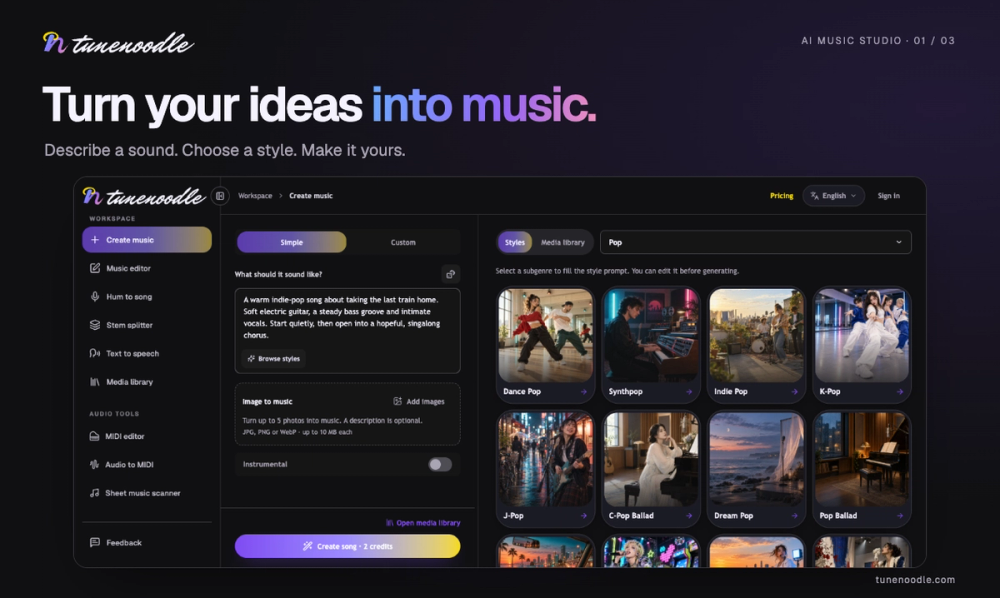
Overview
Tunenoodle combines AI music creation with practical browser-based audio tools. Turn a description, lyrics, an image, or a hummed melody into a song, then keep shaping your ideas in one workspace.
Key Features
- Text to music: Describe a mood, genre, instruments, and vocal style to create a song or instrumental.
- Lyrics to song: Bring your own lyrics or refine an AI-written draft, then explore different musical styles.
- Image and humming inputs: Use a picture or a recorded melody as inspiration for your next track.
- Song editing: Extend a track, regenerate a section, or blend inspiration from two songs. AI edits create new versions while preserving the originals.
- Private library: Organize generated tracks and uploaded audio, mark favorites, and revisit earlier ideas.
- Free audio tools: Estimate BPM, explore chord progressions, adjust speed and pitch, add reverb, and trim audio directly in your browser.
Use Cases
Songwriters can hear lyric drafts in different musical settings. Creators can explore soundtrack ideas for visual projects. Musicians can use the audio tools to slow recordings for practice, change keys, or experiment with chord progressions.
You can begin with a rough idea and refine it through listening and comparison. Try changing one element at a time, such as the tempo, main instrument, or vocal direction.
Getting Started
- Choose a starting point: text, lyrics, images, or humming.
- Describe your preferred sound and choose vocals or an instrumental.
- Sign in, review the displayed credit cost, and generate.
- Listen in your library, then refine your prompt or continue editing.
For a first prompt, try: “A warm lo-fi instrumental with soft piano, light drums, and a relaxed rhythm.”
The free local audio tools work without an account. Local processing happens in your browser; AI generation and cloud features require uploading the relevant inputs.
Pricing and Plans
Local browser audio tools are free and require no generation credits. AI creation uses credits, with costs shown before submission. New accounts receive starter credits.
Additional credits are available through one-time packs or subscriptions. One-time pack credits do not expire; subscription credits expire at the end of their paid period. Downloading cloud songs requires an eligible paid pack or an active paid subscription.
Visit the pricing page for current prices and plan details.


